
When Excel stops working
Most small and mid-size fleets start with a maintenance plan in Excel, one file per vessel. It works while one person owns it. The signs that it no longer works are usually these:
- there is more than one copy of the plan, and nobody is sure which one is current;
- running hours are updated once a month, or when someone remembers;
- next due dates are worked out by hand, or by formulas only one person understands;
- the history of a job sits in emails and work reports, not next to the job;
- the office cannot see the fleet in one view without opening ten files;
- before an audit or a Port State Control inspection, someone spends days putting the records together.
None of this is a problem on day one. It grows with the number of ships and with every crew change.
What a PMS needs from your files
A planned maintenance system needs the same information your spreadsheet already holds, but in a regular shape. Prepare it in Excel before the move:
- Equipment list: for each vessel, grouped by system (main engine, auxiliary engines, pumps, deck machinery, safety equipment), with maker, model and serial number where you have them.
- Jobs: what is done on each piece of equipment, and which rank or department does it.
- Intervals: by calendar (every 3 months), by running hours (every 2,000 hours), or both, whichever comes first.
- Last done: the date the job was last done and, for running hours jobs, the counter reading at that time. Without it, the first due dates are guesses.
- Running hours: the current counter reading for every machine that has one.
- Critical equipment: a mark on the equipment that the ISM Code asks you to follow with special care.
| System | Equipment | Job | Interval | Last done | Hours at last done |
|---|---|---|---|---|---|
| Main engine | Main engine | Fuel injectors overhaul | 4,000 h | 12.03.2026 | 48,200 |
| Auxiliary engines | Aux engine no. 1 | Lube oil filter renewal | 1,000 h or 3 months | 02.05.2026 | 21,450 |
| Safety | Emergency fire pump | Test run | 1 week | 20.10.2026 | Not used |
Example rows for one vessel. The numbers are for illustration only.
Clean the data before you move it
Cleaning in Excel is faster than cleaning in a new system after the import. Before the move:
- One name for each piece of equipment, the same on every sister ship.
- Remove jobs nobody does any more, and jobs that appear twice under different names.
- Check the intervals against the makers' recommendations and class requirements, and note where you differ on purpose.
- Mark the critical equipment, so it can be followed separately.
- Agree what "done" means: the date, the running hours, who signed and the remarks.
The order of the move
- Pick one vessel for a start, ideally one with a good Excel plan and a chief engineer who will give honest feedback.
- Prepare its data in one template: equipment, jobs, intervals, last done dates and running hours.
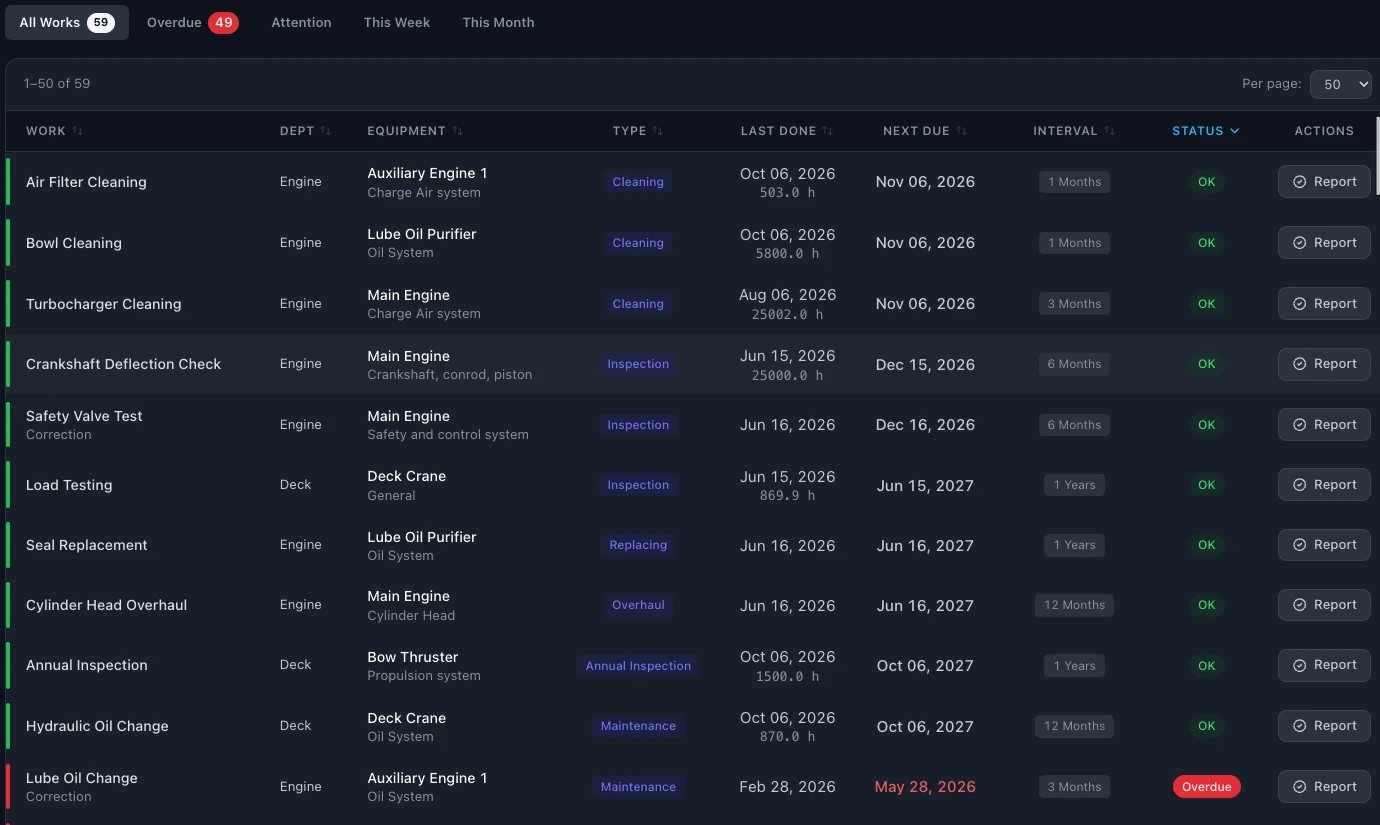
- Import, then check the first due dates with the crew. A due date that looks wrong usually points to a wrong last done date or interval.
- Plan only in the new system from that day. Keep the old file read-only, for reference.
- Fix the template with what you learned, then move the sister ships, then the rest of the fleet.
- Show the crew how to enter running hours, close a job with remarks and log a breakdown.
Keeping the history
The next due date of every job depends on when it was last done, so the last done record is the one thing you must bring over. For most fleets it is enough to start.
Older records can stay in the old files. Keep them as a read-only archive, so they are there when an auditor asks for the maintenance records of the last years, and nobody edits them by mistake.
Common mistakes
- Moving the file as it is, with its duplicates and old jobs. The new plan starts with the old problems.
- No counter reading at the last job. Every running hours job then comes out overdue, or far in the future.
- Different names on sister ships. The fleet view no longer adds up.
- Excel and the new system side by side for months. The crew enter everything twice and stop trusting both.
- No owner in the office. Someone has to answer the crew's questions and approve changes to the plan.
After the move: what to check
- Every vessel has its equipment, jobs and intervals.
- The first due dates are agreed with the chief engineers.
- Critical equipment is marked.
- Running hours are entered and updated on board.
- Overdue jobs are real, not import errors.
- The old Excel files are kept read-only.
- The crew know how to close a job and log a breakdown.
- One person in the office owns the plan.
Moving to SEA360
You can prepare your plan in Excel and load vessels, equipment, intervals and last done dates yourself, or we can help you with the move. We go through the import with you and help set up running hours and critical equipment.
After that, a job can be planned by date, by running hours or both, whichever comes first. The crew enter running hours on board, also without a connection, and the next due date is recalculated. Every completed job keeps its date, running hours and remarks, and the plan can be exported to Excel or PDF at any time.