
No certificate expires quietly.
Statutory, class and insurance certificates in one register, with expiry dates, survey windows and scanned copies attached. Each one is marked valid, attention, due or overdue, so renewals get planned instead of rushed.
Book a demo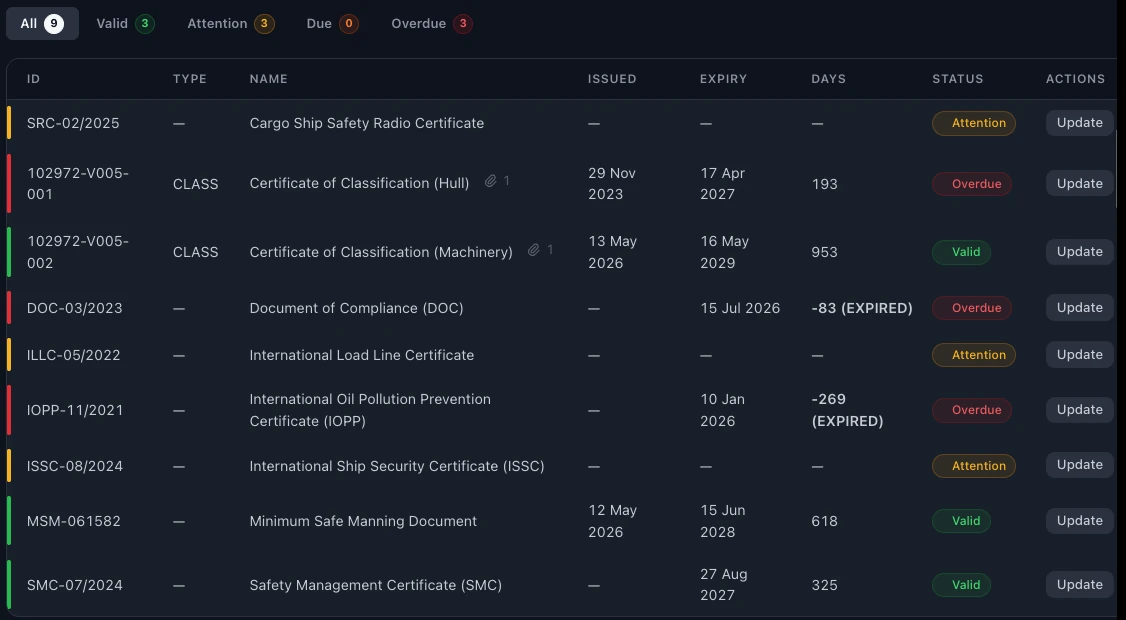
Certificates and survey dates should not live in someone's inbox.
In many fleets the certificate list is a spreadsheet, and the scans are in email threads. It works until a survey window passes without anyone noticing, and the first warning is a finding from class or Port State Control.
Most statutory certificates are valid for five years, with annual or intermediate surveys inside a window around each anniversary date. A missed window can be as serious as an expired certificate.
A certificate register keeps every certificate, its dates and its scanned copy in one place, and shows what needs attention before it becomes urgent.
One register for every certificate on every vessel.
Statutory, class and insurance
All certificates for every vessel in one register.
Expiry dates and survey windows
Each certificate shows its expiry date and its survey window.
Valid, attention, due, overdue
Every certificate is marked with one of four statuses, so you see at a glance what needs action.
Scanned copies attached
The scanned certificate sits next to its record. No searching through email.
Email reminders
The office gets an email before a certificate or survey window comes due.
Fleet overview
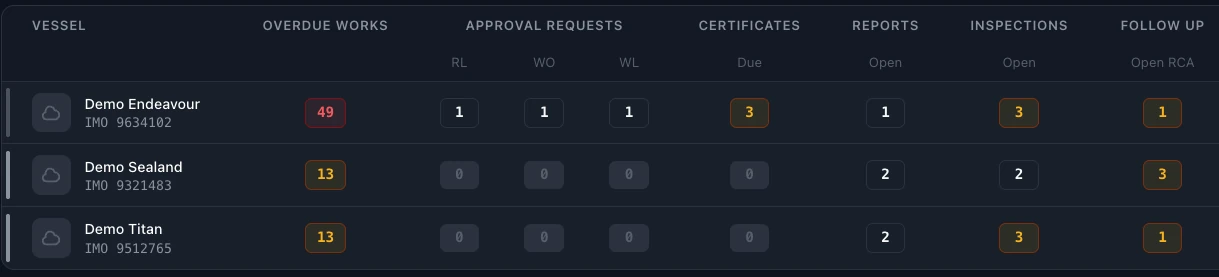
Certificates due are shown next to each vessel on the dashboard.
Available on board
The crew see the certificate list and the scanned copies on board, also without a connection.
Export and print
Export the register to Excel or PDF at any time.
Certificates due, for every vessel.
Each vessel has a score next to its overdue jobs, certificates due, open inspections and requests waiting for approval. Open the dashboard in the morning and you know which ship needs you first.
The first thing the inspector checks.
A PSC inspection usually starts with the ship's certificates and documents. When the inspector asks, the answer is already on screen.
- Are all statutory certificates valid, with surveys inside their windows? The certificate register shows expiry, survey window and the scanned copy.
- When is the next annual survey due? Class certificates and survey dates sit in the same register as statutory ones.
- Can I see the original? The scanned copy is attached to each certificate.
From your certificate list to SEA360.
- 01
Import your list
Load your certificates and their dates from Excel.
- 02
Attach the scans
Add the scanned copy to each certificate.
- 03
See what is due
Each certificate is marked valid, attention, due or overdue, and the dashboard shows what is due across the fleet.
Questions about certificates in SEA360.
What is ship certificate management?
Keeping every statutory, class and insurance certificate of a vessel, with its expiry date, survey windows and a copy, in one register, so that renewals and surveys are planned in time.
What is a survey window?
The period in which a periodic survey must be done. For most statutory certificates the annual survey can be done within three months before or after the anniversary date, and the renewal survey within three months before expiry.
Which certificates can we track?
Statutory, class and insurance certificates for every vessel.
Do we get reminders before a certificate expires?
Yes. The office gets an email before a certificate or survey window comes due.
Can the crew see the certificates on board?
Yes. The crew see the certificate list and the scanned copies on board, also without a connection. Changes sync when the ship is back online.
How many users can work in SEA360?
There is no limit on users. The subscription is per vessel. Book a demo for pricing.