
From requisition to invoice, in one place.
Requisitions, orders, stock and suppliers for every vessel. Each invoice is checked against its order, so price changes don't pass unnoticed.
Book a demo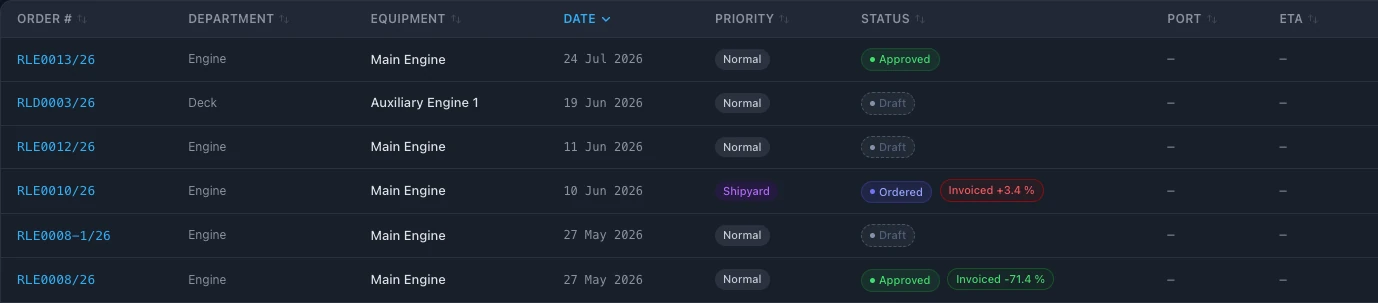
Spare part orders should not live in emails and messages.
In many fleets a requisition starts as an email from the ship, the quote arrives in another thread, the order is confirmed by phone and the invoice comes a month later as a PDF.
Nobody sees the whole chain. Prices change between quote and invoice, parts are ordered twice, and the ship asks again for something that was already delivered.
A procurement system keeps the requisition, the quote, the order, the delivery and the invoice together, for every vessel.
Every purchase, from the ship's request to the checked invoice.
Requisitions from the ship
The crew raise requisitions on board when the ship is online, and can see them also without a connection.
Approvals you set
Requisitions and orders go through the approvals you set, for example superintendent and then technical manager.
Supplier quotes
Ask several suppliers for quotes and compare them side by side before you approve one.
Orders and delivery
Each order shows its status, the port of delivery and the expected arrival.
Invoice checked against the order
The invoice is compared with the approved order line by line. Any difference in price or quantity is highlighted.
Stock on board
What is on board for every spare part and store, with minimum levels and a warning when stock falls below them.
Deliveries into stock
Delivered items are received into stock on board.
Spend against budget
Orders count against each vessel's budget, so planned and actual spend stay side by side.
Who approved what, and when.
Every change is recorded in the system log: who, what and when.
From emails and spreadsheets to one system.
- 01
Set up suppliers and stock
Add your suppliers and the spare parts and stores on each vessel.
- 02
Set up approvals
Choose who approves requisitions and orders, and in what order.
- 03
Order in one system
The ship raises requisitions, the office approves, compares quotes and orders.
Questions about procurement in SEA360.
What is ship procurement software?
A system for the whole purchasing chain of a ship: requisitions from board, quotes, orders, deliveries and invoices, with stock on board and spend against budget.
Can the crew raise requisitions without internet?
The crew raise requisitions when the ship is online, and the office receives them right away. Requisitions can be seen on board also without a connection.
How does the invoice check work?
The invoice is compared with the approved order line by line. Any difference in price or quantity is highlighted.
Can we compare supplier quotes?
Yes. Ask several suppliers for quotes and compare them side by side before you approve one.
Are orders included in the vessel budget?
Yes. Orders count against each vessel's budget automatically, planned against actual.
How many users can work in SEA360?
There is no limit on users. The subscription is per vessel. Book a demo for pricing.