
Planned maintenance for every vessel, by date and running hours.
Every job has its interval, next due date and full history. The office sees what is overdue across the fleet, the crew sees what is due on board.
Book a demo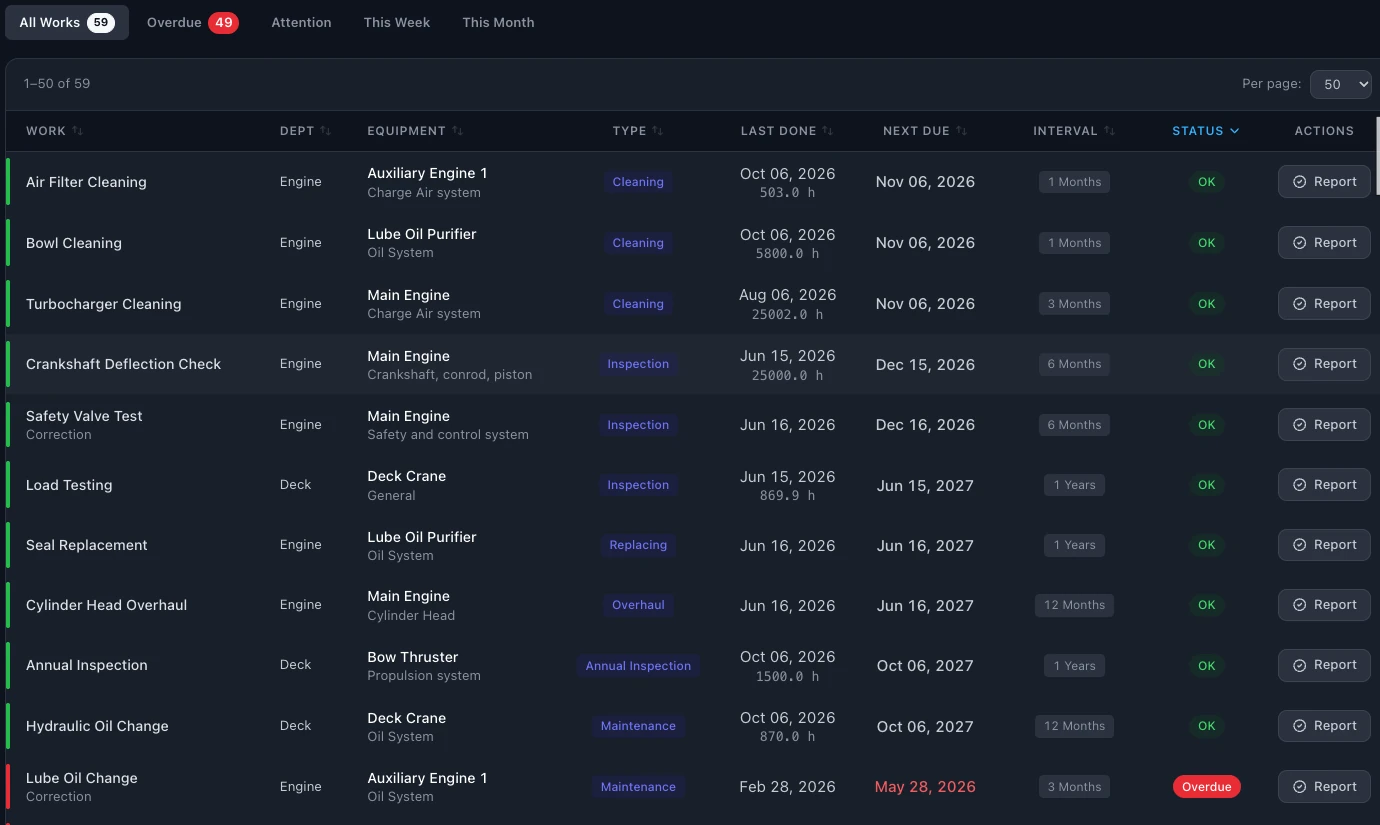
A spreadsheet can list the jobs. It cannot tell you what slipped.
Most small and mid-size fleets start with an Excel plan per vessel. It works while one person owns it. Then the file is copied, the running hours stop being updated, and the first sign of a missed job is a finding from class or Port State Control.
A planned maintenance system keeps one plan per vessel, calculates the next due date from the interval, and shows the overdue work before anyone has to look for it.
Everything the technical office needs from a PMS.
By date and by running hours
A job can be planned by date, by running hours, or both, whichever comes first. The crew enter running hours on board and the next due date is recalculated.
Engine performance
Main and auxiliary engine readings are compared against shop test data.
Overdue, this week, this month
Filter the plan by what is overdue, due this week or due this month, for one vessel or the whole fleet.
Full job history
Every completed job keeps its date, running hours and remarks. Job history for each piece of equipment can be exported to PDF.
Unscheduled work
Log breakdowns and unscheduled repairs when they happen, so the history is complete.
Critical equipment
Critical equipment is flagged in the plan, with its test history.
Works offline on board
The crew keep working without a connection. Data syncs when the ship is back online.
Export and print
Export the plan to Excel or print it for the ship's files. Requisitions, orders and stock are kept in the same system.
One screen for the whole fleet.
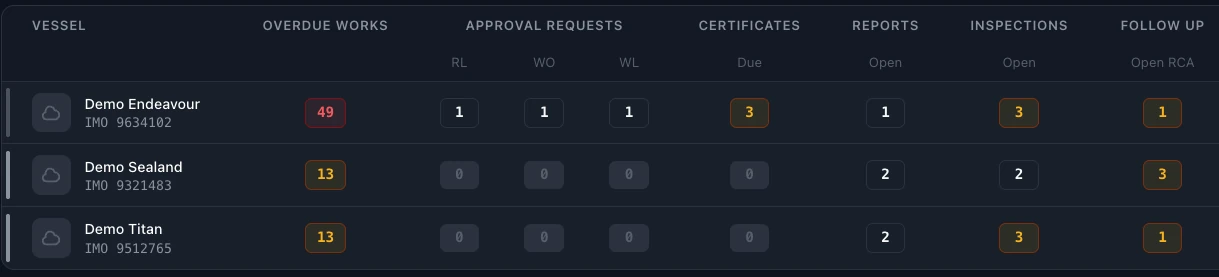
Each vessel has a score next to its overdue jobs, certificates due, open inspections and requests waiting for approval. Open the dashboard in the morning and you know which ship needs you first.
Ready when the inspector asks for the records.
Section 10 of the ISM Code asks the company to maintain the ship and its equipment, keep records of that maintenance and pay special attention to critical equipment.
- Show me the maintenance records for the last twelve months. Job history for each piece of equipment, exported to PDF.
- Which equipment is critical, and when was it last tested? Critical equipment flagged in the plan, with its test history.
- Who changed this job, and when? Every change is recorded in the system log: who, what and when.
From your current plan to SEA360.
- 01
Import your plan
Load vessels, equipment, intervals and last done dates from your Excel files.
- 02
We help with the setup
We go through the import with you and help set up running hours and critical equipment.
- 03
Work in one plan
The crew and the office see the same jobs, due dates and history.
Questions about planned maintenance in SEA360.
What is a planned maintenance system on a ship?
A planned maintenance system (PMS) is the list of maintenance jobs for every piece of equipment on board, each with an interval by date or running hours, plus the record of when each job was done. The ISM Code requires the company to maintain the ship and keep these records.
Does SEA360 handle running-hour based maintenance?
Yes. A job can be planned by date, by running hours, or both, whichever comes first. The crew enter running hours on board and the next due date is recalculated.
Can the crew use it without internet?
Yes. SEA360 works offline on board and syncs when the ship is back online.
How do we move from Excel?
You import your current plan from Excel and we help you with the setup.
How many users can work in SEA360?
There is no limit on users. The subscription is per vessel. Book a demo for pricing.
Can we export our data?
Yes. Export to Excel or PDF at any time.