
Drills on time. Every report followed up.
Drills, near miss and incident reports for every vessel. The crew record them on board, also without a connection, and the office follows each one up.
Book a demo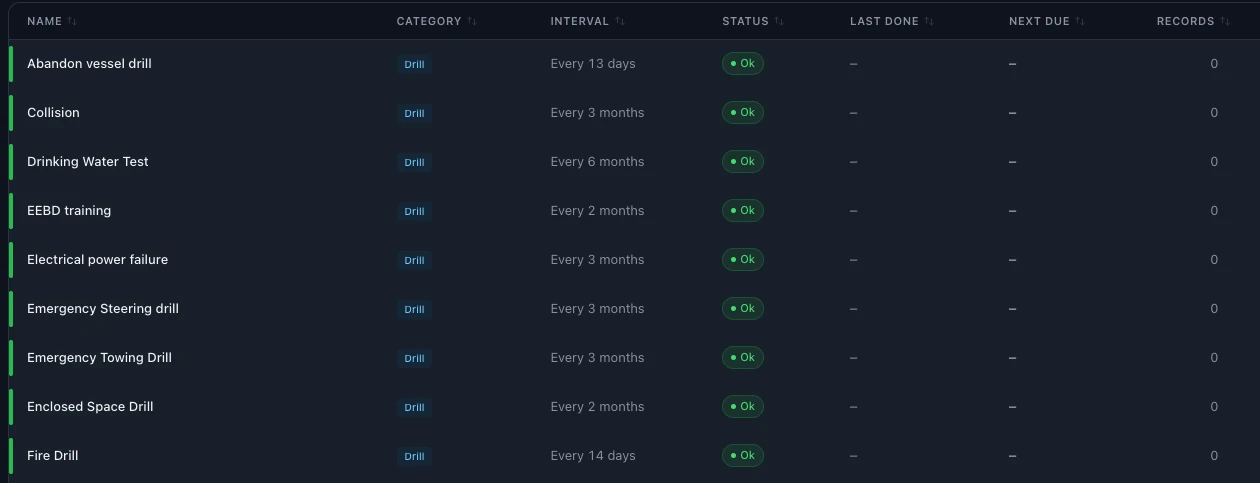
Safety on board is proved by records.
The ISM Code asks every company to train its crews with regular drills and to have procedures for reporting accidents, hazardous situations and non-conformities.
When drill records sit in logbooks and reports arrive by email, it is hard to show an auditor that drills are done on time, and hard to see the same problem coming back.
One register keeps the drill plan, the drill records and the reports together, for every vessel.
Drills and reports, from the ship to the office.
Drills on schedule
Every drill has its interval, last done date and next due date, with its status.
Your own drill list
Fire, abandon ship, enclosed space, emergency steering and the other drills and trainings you set, each with its interval.
Drill records
Each drill is recorded on board with its date, remarks and who took part.
Photos and documents
Attach photos and documents to drill records and to reports.
Safety reports
Near misses, incidents and accidents, failures, hazard observations and non-conformities.
Date and place on board
Each report keeps the date and the place on board, such as the bridge or the engine room, and any equipment involved.
From report to root cause
A report can start a root cause analysis and a corrective action, followed until it is closed.
More about inspections and auditsWorks offline on board
The crew record drills and make reports without a connection. Data syncs when the ship is back online.
Every report, followed up.
Each report shows its type, the date and place on board, the findings and the status.

From logbooks and emails to one register.
- 01
Set up drills
Choose the drills and trainings for each vessel and their intervals.
- 02
Record and report on board
The crew record drills and make reports, also without a connection.
- 03
Follow up in the office
The office reviews each report, starts the root cause analysis and closes the corrective actions.
Questions about safety and compliance in SEA360.
What should a ship report under the ISM Code?
The ISM Code asks the company to have procedures for reporting accidents, hazardous situations and non-conformities, so that they are investigated and corrected.
Which reports can the crew make?
Near misses, incidents and accidents, failures, hazard observations and non-conformities.
Which drills can we plan?
Fire, abandon ship, enclosed space, emergency steering and the other drills and trainings you set for each vessel, each with its interval.
What is recorded for a drill?
The date, remarks and who took part. Photos and documents can be attached.
Can the crew use it without internet?
Yes. The crew record drills and make reports on board without a connection. Data syncs when the ship is back online.
How many users can work in SEA360?
There is no limit on users. The subscription is per vessel. Book a demo for pricing.