
Every dry dock, planned as a project.
Dry docks and repairs as structured projects: scope, yard quotes and budget in one place.
Book a demo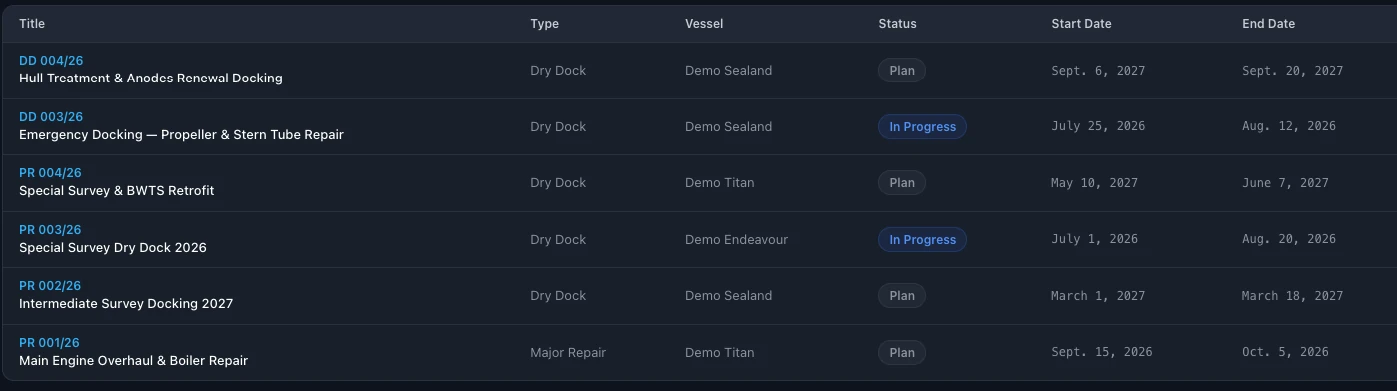
A dry dock is too expensive to plan in emails.
A docking brings together the class survey, the maintenance that waited for the dock, the yard's quote and a budget that is easy to overrun.
When the specification is a Word file, the quotes are PDFs in different formats and the budget is a separate spreadsheet, it is hard to keep the scope, the quotes and the budget together.
A project in one system keeps the scope, the specification, the quotes and the budget together, from the first plan to the end of the work.
From the first plan to the last item done.
Dry docks, repairs and retrofits
Each docking, major repair or retrofit is a project with its vessel, type, status and dates.
Plan and in progress
Projects are marked plan or in progress, for every vessel in the fleet.
Scope by item
The scope is a list of work items, each with its status, so progress in the yard is visible.
Jobs from the maintenance plan
Jobs that wait for the dock can be added to the scope from the maintenance plan.
More about planned maintenanceSpecification for the yards
Export the specification to PDF, with a title page and the project photo, ready to send to yards.
Yard quotes
Yard quotes are kept with the project.
Budget in your currency
Each project has its budget in the currency you choose.
All projects of the fleet
Every dry dock and repair of the fleet in one list, with vessel, status and dates.
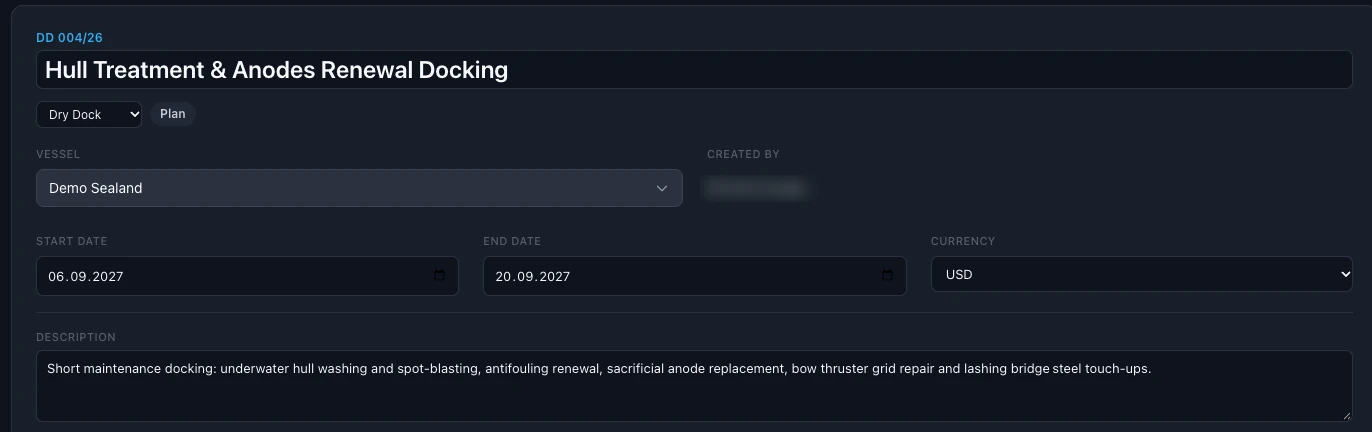
Everything about the docking on one page.
Vessel, type, status, dates, currency and the description of the work.
From the first plan to the yard.
- 01
Create the project
Choose the vessel, the type and the dates.
- 02
Build the scope
Add work items and the jobs from the maintenance plan that wait for the dock.
- 03
Send and follow
Export the specification for the yards, keep their quotes with the project and follow each item to completion.
Questions about dry docks and projects in SEA360.
What is dry dock management software?
A system that keeps a docking or a major repair as one project: the scope of work, the specification for the yards, the quotes, the budget and the dates, from the first plan to the end of the work.
Which projects can we plan?
Dry docks, major repairs and retrofits, each for its vessel, with its status and dates.
Can maintenance jobs go into the dry dock scope?
Yes. Jobs from the maintenance plan that wait for the dock can be added to the scope.
Can we send a specification to the yards?
Yes. Export the specification to PDF, with a title page and the project photo, ready to send to yards.
How do we follow the work in the yard?
Each work item in the scope has its status, so you see what is done and what is still open.
How many users can work in SEA360?
There is no limit on users. The subscription is per vessel. Book a demo for pricing.